'/%3e%3cpath%20class='cls-1'%20d='M102.9367,9.2805V25.6767L89.918,9.2805H88.1572V29.487h2.1359V13.0908l12.99,16.3962h1.7609V9.2805ZM113.762,27.64V20.1341h10.45V18.3157h-10.45V11.1279h11.72V9.2805h-13.856V29.487h14.2888V27.64Zm17.1756,1.8473h13.4518V27.64H133.0738V9.2805h-2.1362V29.487Zm17.0025,0h13.4518V27.64H150.0763V9.2805H147.94V29.487Zm17.0025,0h2.1362V9.2805h-2.1362V29.487Zm14.2892.1732c5.167,0,7.5339-2.54,7.5339-5.5134,0-7.361-12.4413-4.0127-12.4413-9.555,0-2.02,1.6453-3.6661,5.34-3.6661A10.401,10.401,0,0,1,185.2069,12.6l.7217-1.7034a11.4072,11.4072,0,0,0-6.264-1.79c-5.1383,0-7.4477,2.5694-7.4477,5.5426,0,7.4764,12.4415,4.07,12.4415,9.6126,0,1.9919-1.6452,3.58-5.4266,3.58a9.9225,9.9225,0,0,1-6.6682-2.4537l-.8374,1.6452C173.2274,28.5921,176.2007,29.66,179.2318,29.66Z'%20transform='translate(-2.0003%20-1.3571)'/%3e%3cpath%20class='cls-1'%20d='M105.91,61.4714h4.907l-9.0351-20.2067H97.1637L88.1572,61.4714h4.7917l1.79-4.33h9.3816l1.79,4.33Zm-9.67-7.8806,3.204-7.7363,3.2043,7.7363Zm25.2295,8.227c5.7444,0,9.1508-3.2907,9.1508-9.2372V41.2647h-4.6188V52.4074c0,3.8392-1.6455,5.4269-4.5031,5.4269-2.829,0-4.5034-1.5877-4.5034-5.4269V41.2647h-4.6763V52.5806c0,5.9465,3.4063,9.2372,9.1508,9.2372Zm23.44,0a10.3827,10.3827,0,0,0,8.3424-3.6082L150.25,55.4385a6.4405,6.4405,0,0,1-5.0805,2.3958,6.199,6.199,0,0,1-6.4664-6.4661,6.1991,6.1991,0,0,1,6.4664-6.4664A6.5017,6.5017,0,0,1,150.25,47.269l3.0019-2.7711a10.4313,10.4313,0,0,0-8.3134-3.58c-6.293,0-10.97,4.3591-10.97,10.45s4.6766,10.45,10.9406,10.45Zm15.4727-.3464h4.6763V45.0753h6.4661V41.2647H153.9156v3.8106h6.4661V61.4714Zm13.6539,0h4.6763V41.2647h-4.6763V61.4714Zm19.254.3464c6.3508,0,11.056-4.4166,11.056-10.45s-4.7052-10.45-11.056-10.45c-6.38,0-11.0559,4.4456-11.0559,10.45s4.6763,10.45,11.0559,10.45Zm0-3.9835a6.164,6.164,0,0,1-6.3218-6.4661,6.3235,6.3235,0,1,1,12.6437,0,6.1642,6.1642,0,0,1-6.3219,6.4661Zm28.4913-16.57V53.5333L211.7355,41.2647h-3.8681V61.4714h4.6185V49.2031l10.0746,12.2683H226.4V41.2647Z'%20transform='translate(-2.0003%20-1.3571)'/%3e%3crect%20class='cls-2'%20x='75.5095'%20y='8.0046'%20width='1.5815'%20height='52.4561'/%3e%3c/svg%3e)
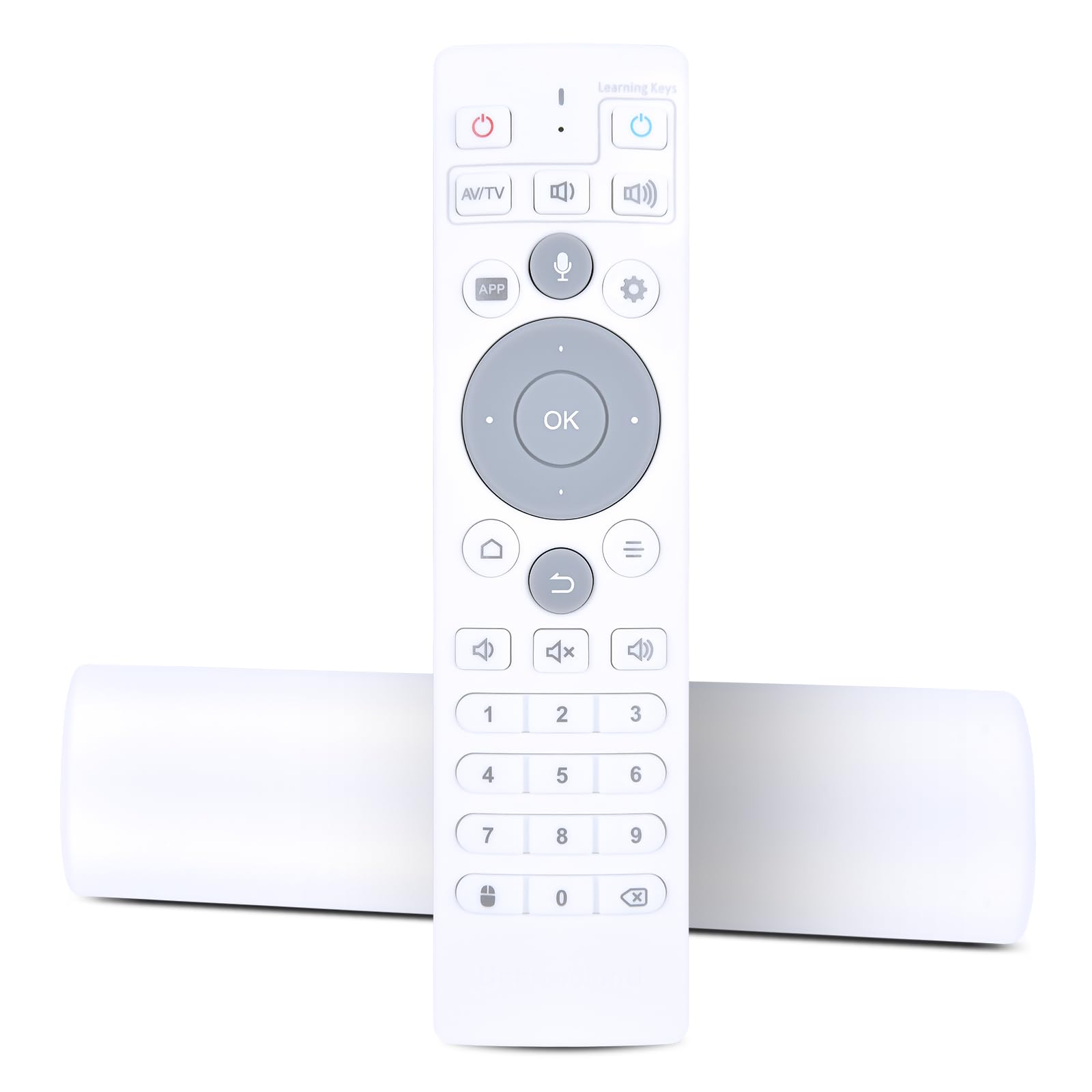
PZL Replacement for Ubox TV Set-Top Box Remote Control with Voice Function, Compatible with Ubox10 Ubox11 Ubox12 UB11 UB10 UB12
PZL Replacement for Ubox TV Set-Top Box Remote Control with Voice Function, Compatible with Ubox10 Ubox11 Ubox12 UB11 UB10 UB12
Description
PZL Replacement Remote Control for TV Package Included: 1 x Remote Control (Batteries and Instructions are Not Included). How to use the remote control's learning mode? 1. Press and hold the "Power" button in the TV control section of the TV box remote for about 5 seconds, until the red indicator light stays on. This means the remote has entered learning mode. 2. Press the button you want to program. The red indicator light will start flashing. The remote is now in learning receive mode. 3. Point the original TV remote at the TV box remote at a distance of about 2-3 cm, and press the button you want to copy 4. When the learning is successful, the red indicator will flash quickly three times and then stay on. You can now proceed to program another button. 5. If learning fails, the red indicator will flash 5 times, then return to learning mode. Please repeat steps 2-4. After programming is complete, press any button outside the TV control area to exit learning mode. The red indicator light will turn off.
Item Details
Seller

Nellis Auction
Pickup Location
6520 Westwind Rd, Ste 100
Las Vegas, NV, 89118
Quality
Estimated Retail Price
$16.99
Buyers Premium
15%
Inventory Number
1092056138
Found in
Additional Details from the Manufacturer
This item information is coming from the manufacturer. Some of the details may vary from the Nellis Auction listing. Please check the Quality Rating and Notes for information specific to this listing
brand
PZLcolor
Whitedimensions
Package: 0.10 lbMore features
- Compatible Models: PZL replacement remote control for TV Box Ubox10 Ubox11 Ubox 10 11 12 Pro Max
- Switch BT Mode: Press the OK button and the Home button (the button with the three horizontal lines) at the same time and hold them down for about 5 seconds. Then the blue light will turn on, and the remote control will enter Bluetooth mode. Go to Settings and set "BT" on the Box. Find "UB-RC" and pair it.
- Easy To Use: New ABS material, better craftsmanship, and ergonomic arc design ensure easy to hold. The keys are responsive and feel great to touch. With a control distance of over 26 feet and an angle of more than 120 degrees, you'll have a better and free remote control experience.
- Package Included: 1 x IR remote control (Batteries and Instructions are Not Included). It can solve the problem when your home remote control doesn't work and becomes your backup remote control.
- After-sales service: If you have any questions about your order or model, we will provide timely service within 24 hours.
See the deals
Get in on the action, thousands of new items added daily. Bid and win!
Start bidding now