
Explore Productsended
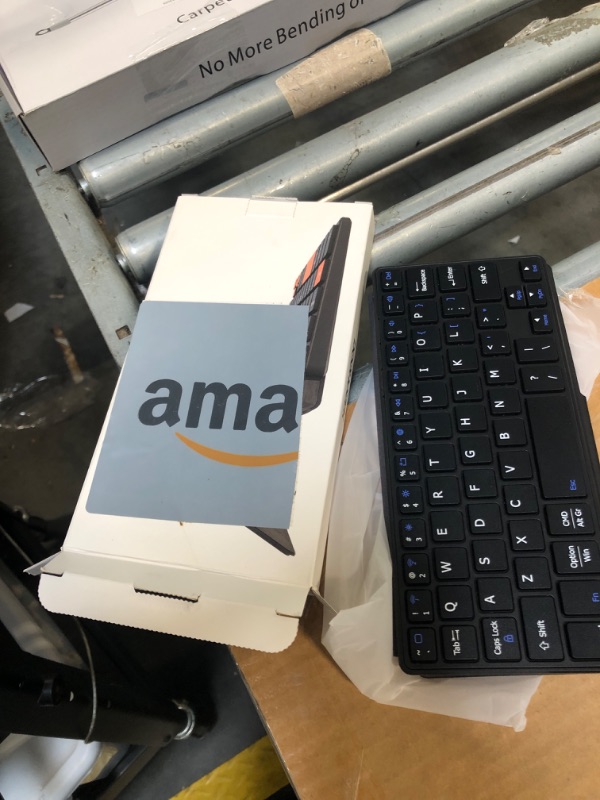
Doohoeek Universal Bluetooth Keyboard for Samsung Galaxy Z Fold, iPad mini 7 2024 & Phones, Dual Bluetooth Mini Keyboard with Any-Angle Kickstand & Leather Cover for Android, Windows and iOS
Doohoeek Universal Bluetooth Keyboard for Samsung Galaxy Z Fold, iPad mini 7 2024 & Phones, Dual Bluetooth Mini Keyboard with Any-Angle Kickstand & Leather Cover for Android, Windows and iOS

Item Details
Pickup Location
3615 W Grand Pkwy N
Katy, TX, 77449
Quality
New
Functional
No Damage
No Assembly Needed
In Package
No Missing Parts
Estimated Retail Price
$24.80
Buyers Premium
15%
Inventory Number
1057598971
Additional Details from the Manufacturer
This item information is coming from the manufacturer. Some of the details may vary from the Nellis Auction listing. Please check the Quality Rating and Notes for information specific to this listing
brand
Doohoeekcolor
BlackMore features
- Can't Connect the Bluetooth? Please reset the keyboard and then reconnect the Bluetooth: 1. Turn on the keyboarad; 2. Press and hold the first and the last key at the top row of the keyboard until all indicators start flashing; 3. Bluetooth light flickers quickly, auto entering Bluetooth pairing mode (If not, press Fn + 1 or 2); 4. Search and find "Wireless keyboard".
- Universal Compatible with Multi OS: The keyboard is widely compatible with Android, Windows and iOS devices. Also the basic typing function works with other OS devices such as fire tablets.
- Connect 2 Devices Simultaneously: Compatible with up to 2 devices via Bluetooth, you can easily flow to one device to another by short pressing "Fn" and "1" or "2".
- Compact with Any-Angle Kickstand: The any level of tilt could help you find the perfect angle. You can type, view and read with your devices thanks to the sturdy stand.
- Portable Like A Purse: The keyboard is thin and lightweigh (195mm*85mm*15mm; 174g) to be put in your bag with little bulk. If you want a flexible keyboard for your phones or tablets, this provides a good option.
- Shortcut Keys for Different Systems: No need to press any keys to switch to different OS, only connect the keyboard to your deivices, the shortcuts works with different OS seamlessly. NOTE: to validate the shortcut keys please press "Fn" + shortcut keys.
See the deals
Get in on the action, thousands of new items added daily. Bid and win!
Start bidding now